Showing posts with label csv. Show all posts

Monday, 9 September 2013

Handling data files in a Sage notebook (and some linear regression in Sage)

One of my most viewed videos on +YouTube is the following (briefly demonstrating how to import csv files in to +python):


I'm in the middle of preparing various teaching materials for an upcoming class on coding for mathematicians. I'm teaching this class in a flipped classroom (if you don't know what that is circle +Robert Talbert on G+ who posts a lot of great stuff about it) and as a result I've been screen casting a lot recently. Some of these clips are solely intended for my students (as I don't believe they'd be of interest to anyone else 'to do this exercise try and think about what your base case would be for the recursion to terminate'). I'm just starting to screen cast for the +Sage Mathematical Software System part of the course and needed to put together a little something as to how to import data in to a Sage notebook. As the above video seemed quite helpful to people I thought I'd put together another one that might be helpful.


The data file used can be found here.

Here are the lines of code used in the notebook:

import csv

f = open(DATA + 'reg', 'r')  # Open the data file using the special DATA variable
data = csv.reader(f)
data = [row for row in data]  # Read data using csv library
f.close()

data = [[row[2], row[1]] for row in data[1:]]  # Only use data that is of interest, remove unwanted columns and 1st row

a, b = var('a, b')  # Declare symbolic variables
model(t) = a * t + b  # Define model

fit = find_fit(data, model, solution_dict=True)  # Find fit of model to data

model.subs(fit)  # View the model

p = plot(model.subs(fit), 5, 11, color='red')  # Plot fit
p += list_plot(data)  # Plot data
p

Sunday, 9 June 2013

Comparing Recursive and Iterative Algorithms: Binary Search and Factorial

I'm in the middle of putting together a new course for our undergraduates at Cardiff University. The course is called 'Computing for Mathematics' and will introduce our first year students to programming in general (using python) as well as how a mathematics package can help them during there degree (we'll be using +Sage Mathematical Software System which is a natural extension from python and is also super awesome).

I was prepping some stuff on recursion (which I'm really looking forward to teaching to our mathematics students given the connection to induction) and came across a bunch of posts stating the lack of speed generally associated to recursion:
I thought I'd write some (python) code to see how much slower recursion was. All the code (and data) is in this github repo.


Binary search


The first algorithm I thought I'd take a look at was binary search. I tried to write each algorithm in as basic a way as possible so as to allow for the best possible comparison.

Iterative

Here's the algorithm written iteratively:

def iterativebinarysearch(target):
    """
    Code that carries out a binary search
    """
    first = 0
    last = len(data)
    found = False
    while first <= last and not found:
        index = int((first + last) / 2)
        if target == data[index]:
            found = True
        elif target < data[index]:
            last = index - 1
        else:
            first = index + 1
    return index

Recursive

And here's the algorithm written recursively:

def recursivebinarysearch(target, first, last):
    """
    Code that carries out a recursive binary search
    """
    if first > last:
        return False
    index = int((first + last) / 2)
    if target == data[index]:
        return index
    if target < data[index]:
        return recursivebinarysearch(target, first, index - 1)
    else:
        return recursivebinarysearch(target, index + 1, last)
    return index

The experiment

I timed 10 runs of each of these algorithms on data sets of varying size, for each size choosing a random 1000 points to search. The data is all available in this github repo.

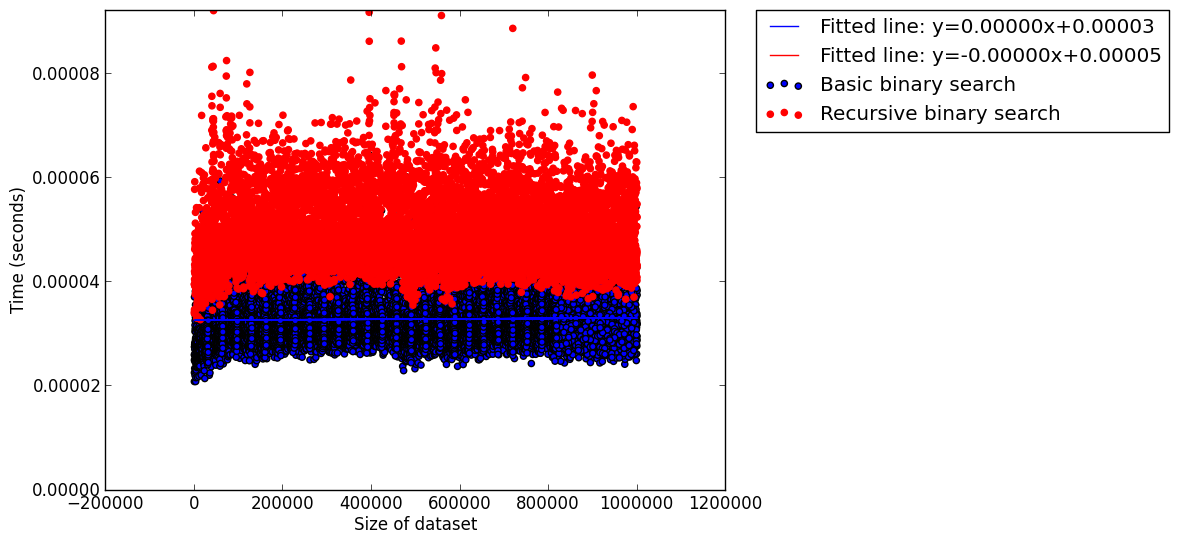
Here's a scatter plot (with fitted lines) for all the data points:


A part from the fact that binary search seems very good indeed, there's not that much going on here apart from perhaps a slight tendency for iterative approach to be a bit slower.

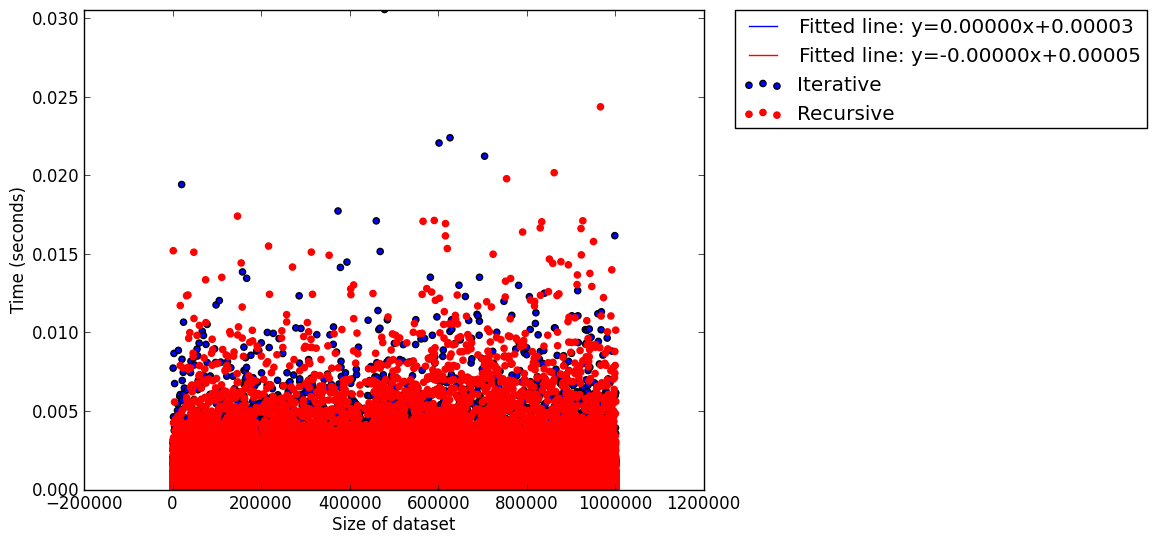
I decided to take a look at the mean time (over the 1000 searches done for each data set):


This seems to show that the iterative approach is slow but again it's not very clear. This is mainly due to the fact that I haven't done any clever analysis. The data sets are pretty big (10,001,000 data points plotted in the 1st graph and 10,001 in the 2nd) so to do anything really useful I'd have to take a look at the data a bit more carefully (the two csv files: 'recursivebinarysearch.csv' and 'iterativebinarysearch.csv' are both on github).

I thought I'd try a 'simpler' algorithm as there are perhaps a bunch of things going on with the binary search (size of data set, randomness of points chosen etc...).

Computing Factorial


The other algorithm I decided to look at was the very simple calculation of $n!$.

Iteration

Here's the simple algorithm written iteratively:

def iterativefactorial(n):
    r = 1
    i = 1
    while i <= n:
        r *= i
        i += 1
    return r

Recursion

Here's the algorithm written recursively:

def recursivefactorial(n):
    if n == 1:
        return 1
    return n * recursivefactorial(n - 1)

The experiment

This was a much easier experiment to analyse however as the timings increased I thought it would also be interesting to look at the ratio of the timings:


We see that first of all the iterative algorithm seems to perform better but as the size of $n$ increases we notice that this improvement is not as noticeable. My computer maxed out it's stack limit  so I won't be checking anything further but I wonder if the ratio would ever get bigger than 1... (This data set: 'factorial.csv' is also on github).

I'm sure that there's nothing interesting in all this from a computer scientists point of view but I found it a fun little exercise :)

Friday, 26 April 2013

Invitation to play a game

So I've blogged about the two thirds of the average game quite a few times now. The latest pos that is kind of a summary of the other posts can be found here.

This post is however a bit different. I'm teaching a new game theory course next year and am busy preparing that. I'm planning on using various interactive games to help with my teaching. As a result I've been figuring out google's app engine so that I can host some of these games online.


The result of this is that I've put together an online open version of the two thirds of the average game that I'd really appreciate you taking the time to play.

The website is: twothirdsoftheaveragegame.appspot.com/ and it will take you 3 minutes to make a guess (you're welcome to guess a bunch of times, only your last guess will count).

Thanks to +Leanne Smith+Zoe Prytherch+Izabela Komenda+Penny Holborn and +Angelico Fetta for testing it for me. Hopefully the bugs are all gone :)

I'll let this run for a week and pick the winner(s) on the 3rd of May at 1200 GMT. That's a week away. I would really aprpeciate you taking the time to play and can't offer much to the winners a part from being named (if you would like me to) in my blog post I write next week :)

So please do take the take to guess, more details about the game itself can be found at the site:


All the code for the site can be found at this github repo.

Saturday, 30 March 2013

Concatenating and removing duplicates from two files

I'm posting this mainly to remind myself how to do this as I keep on forgetting (anyone with good *nix-foo won't learn anything here).

I've been running code for a long time gathering data for a paper I will one day perhaps have time to write. I analyse the csv file routinely thanks to a sleep command and everything is synced in a dropbox folder so if I'm bored I can take a look at this kind of graph every now and then:


(You can see that a particular measure for whatever I'm working on has arrived at steady state.)

Anyway! That's not the point.

The point is that at some point every now and then dropbox will get conflicted copies:


Concatenating (use cat)

First of all I need to gather those two csv files together:

cat Output_file_with_permute.csv Output_file_with_permute\ \(Vince\ Knight\'s\ conflicted\ copy\ 2013-03-06\).csv > fixed.csv

We can check that we do indeed have all the files together using grep -c . to count the number of rows in each file:

cat Output_file_with_permute.csv | grep -c .
cat Output_file_with_permute\ \(Vince\ Knight\'s\ conflicted\ copy\ 2013-03-06\).csv | grep -c .
cat fixed.csv | grep -c .

The output is shown (31499=9702+21798):


Now we need to make sure we don't have any duplicates in fixed.csv.

Removing duplicates

This is really simple using the sort and uniq commands:

sort fixed.csv | uniq > fixed_Output_file.csv

This sorts the file and using the uniq command to just output the unique ones.

If I count how many files are in the new file:

cat fixed_Output_file.csv | grep -c .

I get 21797 rows so it looks like the conflicted file didn't have any rows that the main file was missing.

I've used all this before when I had code running on multiple machines which obviously created a bunch of conflicted copies (because of how dropbox does things) with relevant data all over the place.

The final step is to simply clean all this up by removing the unwanted files:

mv fixed_Output_file.csv Output_file_with_permute.csvrm fixed.csv
rm Output_file_with_permute\ \(Vince\ Knight\'s\ conflicted\ copy\ 2013-03-06\).csv

As I said above the main reason I've written this post is to try and make sure I remember how to do this (I've had to google this everytime I need to do this)...

Tuesday, 27 November 2012

Importing and Exporting data from and to csv files in python

When I first started using Sage one of the challenges was figuring out how to handle data outside of Sage. I made the terrible mistake of trying to learn Sage without knowing any Python. I've subsequently learnt Python (a language I absolutely love) and thought I'd do a short screencast showing how to manipulate csv files with Python.

Here's the screencast:


I thought I'd put the code I wrote up here as well:

import csv

out=open("data.csv","rb")
data=csv.reader(out)
data=[[row[0],eval(row[1]),eval(row[2])] for row in data]
out.close()

new_data=[[row[0],row[1]+row[2]] for row in data]

out=open("new_data.csv","wb")
output=csv.writer(out)

for row in new_data:
    output.writerow(row)

out.close()

Here's a quick explanation (basically repeating what is in the screencast)

The first line imports the csv module:

import csv

The next few lines open a file for reading (denoted by "rb") and use the csv reader method to import the data (the "eval" function is used to handle the fact that all the data is imported as a string).

out=open("data.csv","rb")
data=csv.reader(out)
data=[[row[0],eval(row[1]),eval(row[2])] for row in data]
out.close()

The next line simply creates a new dataset:

new_data=[[row[0],row[1]+row[2]] for row in data]

We then open/create a file called "new_data" for writing (denoted by "wb") and use the csv writer method to export each row of data:

out=open("new_data.csv","wb")
output=csv.writer(out)

for row in new_data:
    output.writerow(row)

out.close()